Webflow Optimize starts at $299 a month billed yearly, or $379 billed monthly, for 25,000 page views, on top of a paid site plan. Here is every tier, the total with a Premium site plan, and cheaper ways to A/B test a Webflow site.

Last checked: November 16, 2026, on webflow.com/pricing and optibase.io/pricing. Webflow can change prices at any time, so confirm on their page before you buy.
Short answer: Webflow Optimize costs $299 a month billed yearly, or $379 billed monthly, for 25,000 page views a month. Prices rise with traffic, up to $1,199 a month billed yearly for 500,000 page views. Optimize is an add-on, so you also pay for a paid site plan. On the Premium plan, the smallest setup comes to $324 a month billed yearly.
If your site already runs on Webflow, Optimize is the obvious first place to look for A/B testing. It lives inside the Designer and needs no extra script. The harder question is what it adds to your monthly bill as traffic grows, and how that compares to other ways of testing a Webflow site. This guide covers every tier, the site plan you pay for on top, and the total at real traffic levels.
Optimize is Webflow's tool for A/B testing, personalization and AI-driven optimization. It is sold per site as an add-on. Three things decide your price: your traffic, how you pay, and the site plan underneath.
Webflow prices Optimize by the number of page views your site gets each month. There are five self-serve tiers: 25,000, 50,000, 100,000, 250,000 and 500,000 page views. Above that, you move to Optimize Enterprise, which goes through sales.
The count covers page views from all visitors to your whole site, not only the pages you test. A busy blog can push you into a higher tier even if you only test your homepage.
Webflow's own guide adds a few useful details. Bot traffic is filtered out of the count. The first month over your limit costs nothing extra, but a second month in a row over the limit upgrades you to the next tier automatically. So a single traffic spike won't move you up a tier, while steady growth will.
Every tier has two prices. Paying yearly saves about 20% compared to paying month to month. At the entry tier, that is $299 vs $379 a month, or $960 a year.
You add Optimize on top of a site plan, and Webflow says add-ons aren't available on the free Starter plan or on Ecommerce site plans. These are the current site plans:
| Site plan | Billed yearly | Billed monthly | Good for |
|---|---|---|---|
| Basic | $15/mo | $25/mo | Simple sites with no CMS |
| Premium | $25/mo | $39/mo | CMS sites, with paid bandwidth add-ons |
| Team | $2,500/mo | Annual contract | Larger teams that need more control |
| Enterprise | Custom | Custom | Custom scale and security |
Most marketing sites with a blog use the CMS, so we use Premium for the totals below.
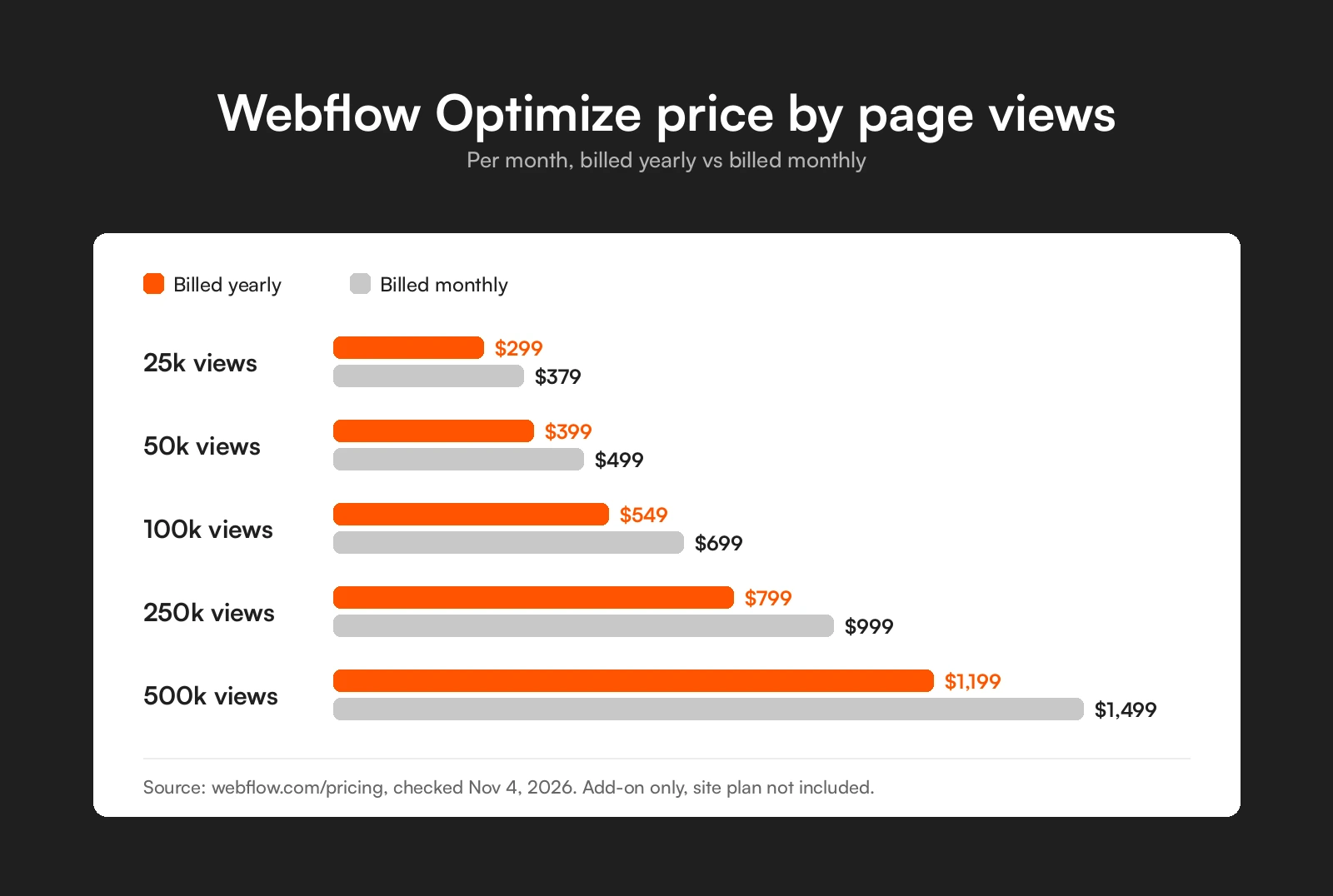
Here is every self-serve tier as listed on the Webflow pricing page.
| Page views a month | Billed yearly | Billed monthly |
|---|---|---|
| 25,000 | $299/mo | $379/mo |
| 50,000 | $399/mo | $499/mo |
| 100,000 | $549/mo | $699/mo |
| 250,000 | $799/mo | $999/mo |
| 500,000 | $1,199/mo | $1,499/mo |
Last checked: November 16, 2026, on webflow.com/pricing.
The top tier costs about four times the entry tier for twenty times the traffic. Per page view, larger sites pay much less.
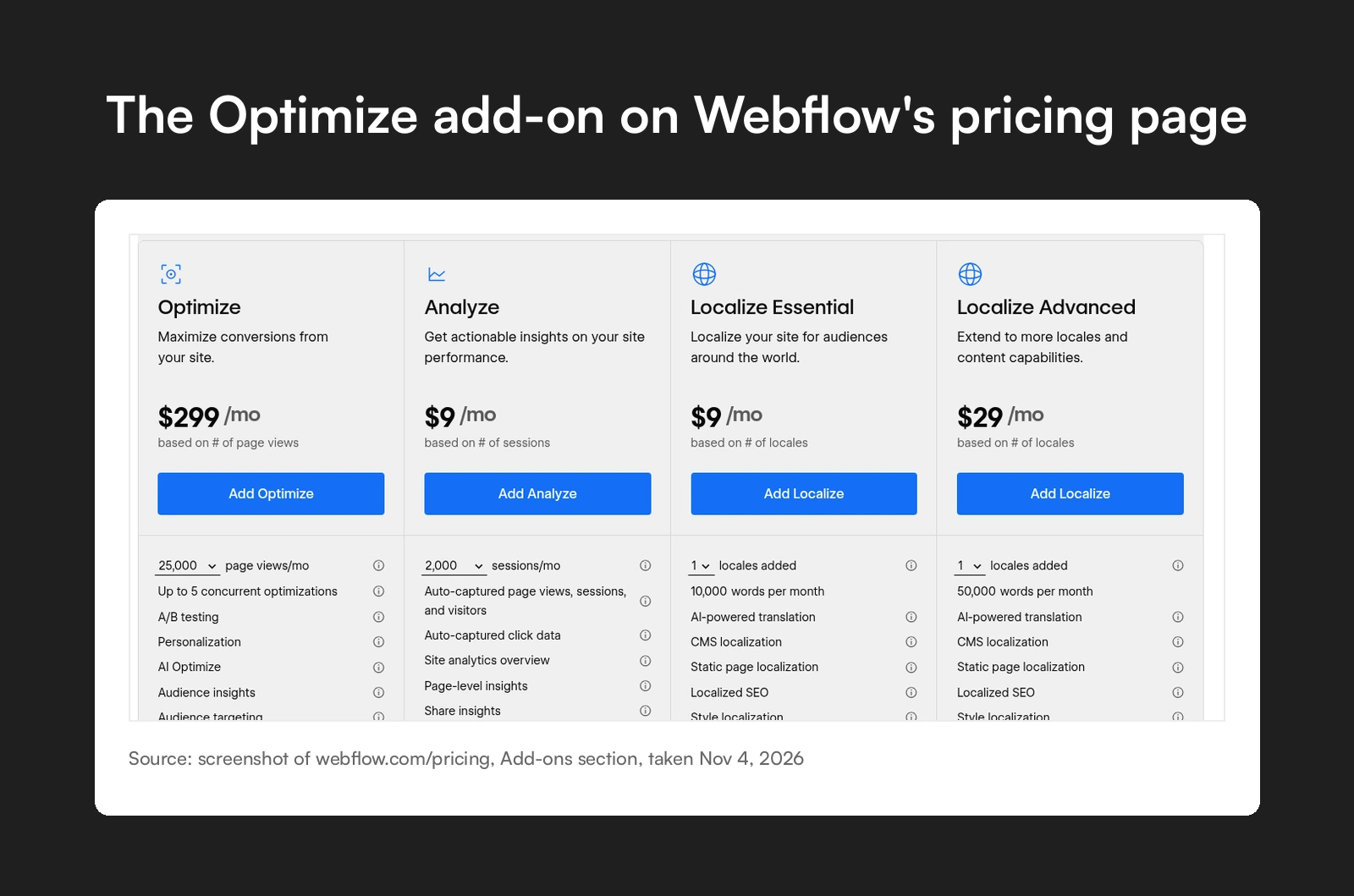
Every self-serve tier has the same features. Only the page view limit changes. You get:
You build variations in the Webflow Designer, so there is no extra testing script to install. AI Optimize doesn't use your Webflow AI credits.
Optimize Enterprise is for sites with 1M+ page views a year, and it is priced through sales. It removes the cap on concurrent optimizations and adds advanced targeting with Enhanced Match, which uses firmographic data such as industry and company size. It also connects to the Webflow Enterprise platform, ABM tools like Demandbase and 6sense, and CRMs. If your team runs ABM campaigns and wants each target account to see its own page, this is the tier built for it.
Optimize can also run on sites built outside Webflow, for example on WordPress. Webflow doesn't publish a price for this, so plan for a sales call.
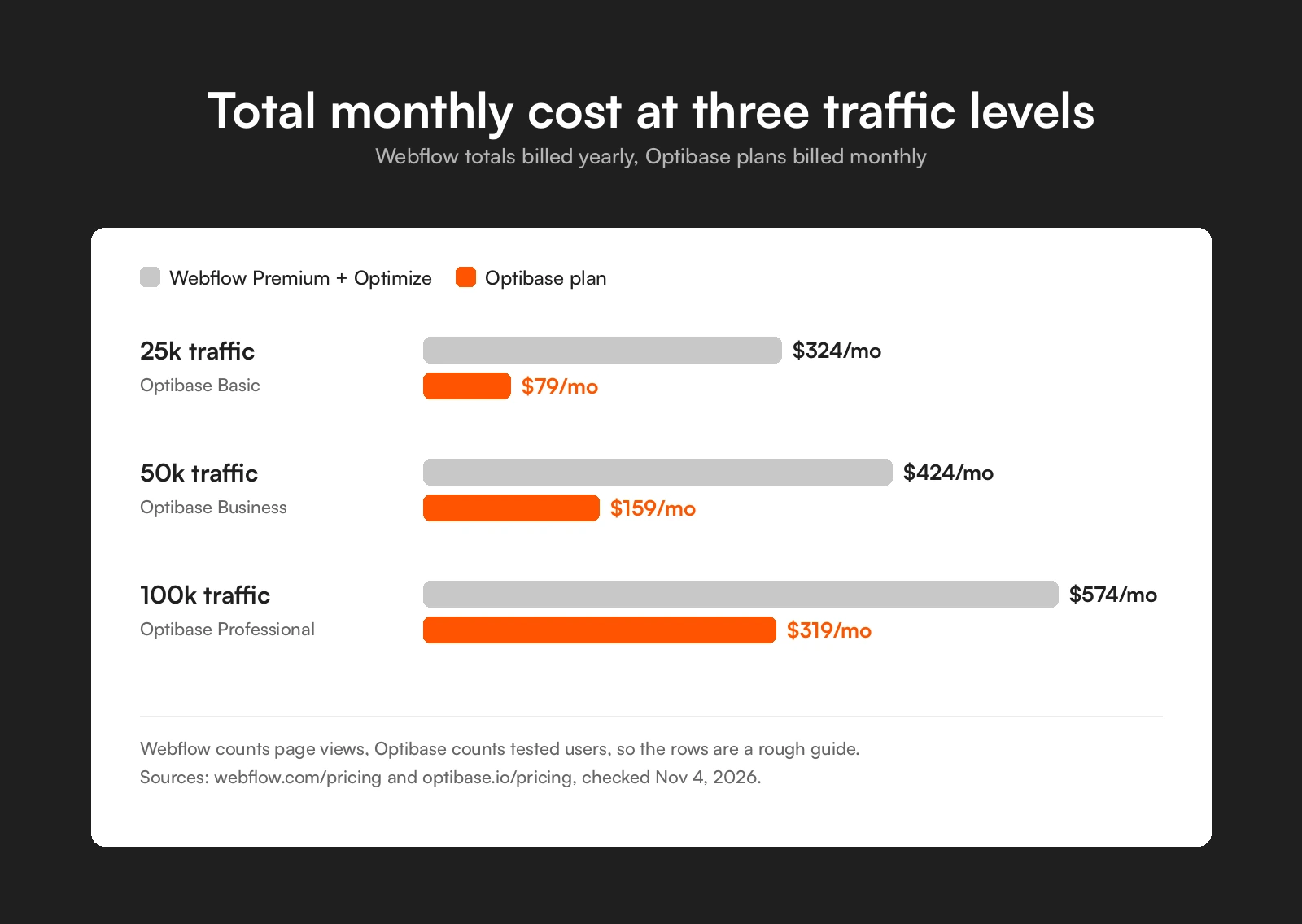
The add-on price alone hides part of the bill. The table below adds the Premium site plan to each Optimize tier, next to the Optibase plan that covers similar traffic.
Read this before the table. The two tools count traffic in different units. Webflow counts every page view on your site. Optibase counts tested users, meaning people who load a page with an active test. One visitor can create many page views, and you rarely need every page in a test. So the rows are a rough guide, not a one-to-one match. Bandwidth add-ons on Premium cost the same either way, so we leave them out.
| Traffic tier | Premium + Optimize, billed yearly | Premium + Optimize, billed monthly | Optibase plan that fits | Optibase price, monthly / yearly |
|---|---|---|---|---|
| 25k | $25 + $299 = $324/mo | $39 + $379 = $418/mo | Basic (20k tested users), or Business (50k) if you test most of your traffic | Basic $79 / $790, Business $159 / $1,590 |
| 50k | $25 + $399 = $424/mo | $39 + $499 = $538/mo | Business (50k tested users) | $159 / $1,590 |
| 100k | $25 + $549 = $574/mo | $39 + $699 = $738/mo | Professional (120k tested users) | $319 / $3,190 |
| 250k | $25 + $799 = $824/mo | $39 + $999 = $1,038/mo | Enterprise (250k tested users) | $3,580 a year |
| 500k | $25 + $1,199 = $1,224/mo | $39 + $1,499 = $1,538/mo | Enterprise (500k tested users) | $6,980 a year |
With Optibase you keep the Webflow site plan you already pay for and add the Optibase app, so the plan price is the full extra cost. Yearly billing on Optibase plans gives you two months free.
For some teams, yes. Optimize makes the most sense when:
It is a harder fit when you mainly want classic A/B tests on a few key pages, your traffic sits in the lower tiers, or your budget is tight. People ask exactly this in the r/webflow thread "Why on earth is Optimize so expensive?", which ranks for this search. Optimize's feature list also doesn't include heatmaps or session recordings, so you may need another tool for those. For many small and mid-size sites, the testing budget goes further with a dedicated app.
If you want to test a Webflow site for less, these are the options we see most often.
Optibase is a native Webflow app for A/B, split URL and multivariate tests, plus personalization. You set up tests inside the Webflow Designer, on the site plan you already pay for. It also works on WordPress through a plugin and on other builders through a script.
The free plan covers 10,000 tested users a month. Paid plans are $79, $159 and $319 a month, or $790, $1,590 and $3,190 billed yearly. Analytics starts on the Business plan, and heatmaps and user recordings are on the Professional plan. Optibase has 3,000+ customers and a 4.6/5 rating on G2. See Optibase pricing for the full plan list, or start free with 10k tested users. No credit card needed.
For a longer list, see the best A/B testing platforms and our guide to A/B testing for Webflow.
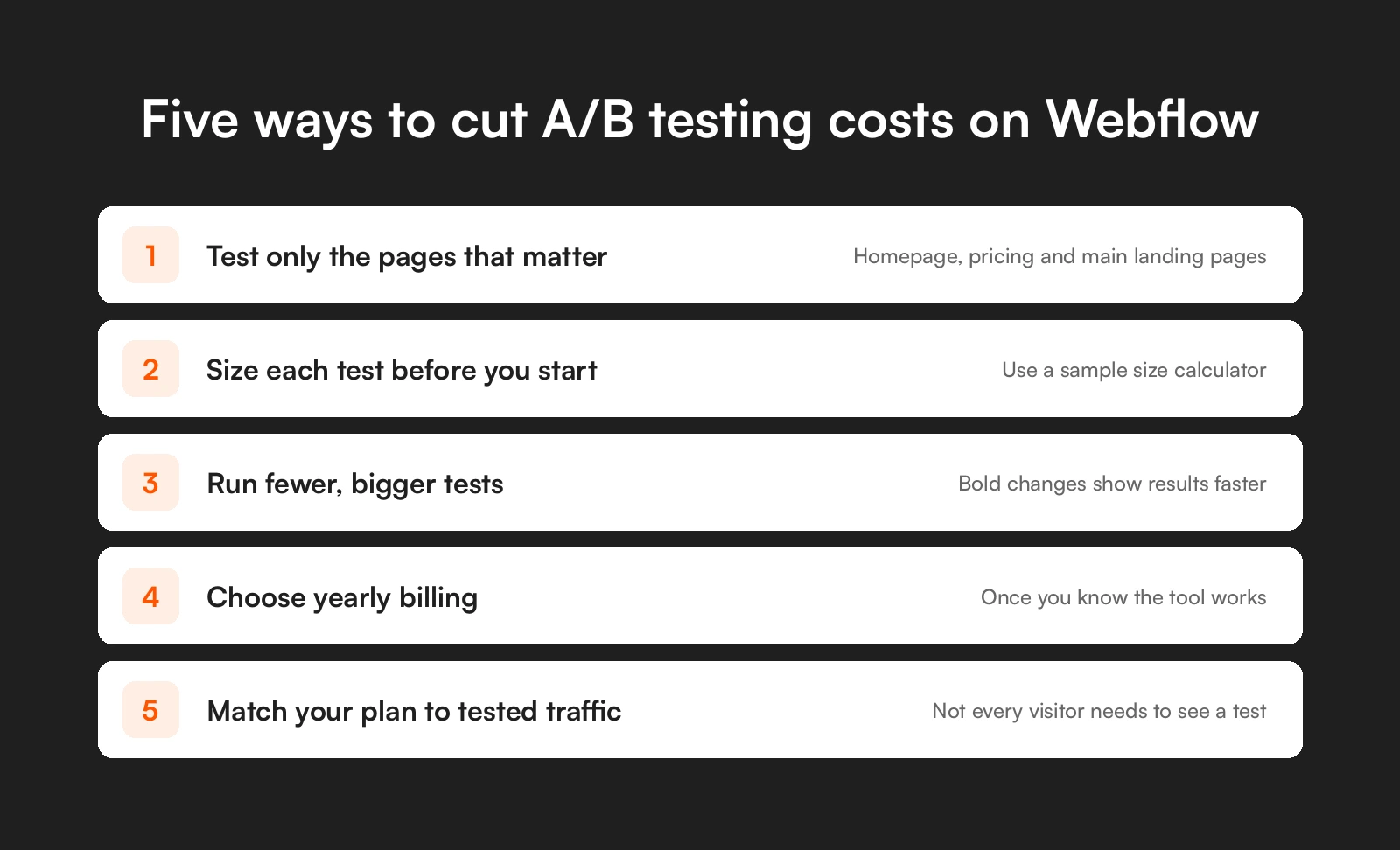
Whatever tool you pick, a few habits keep the bill down.
To try this with no upfront cost, start free with 10k tested users. To see how tests run on a Webflow site, read how Webflow A/B testing works and our Webflow A/B testing guide.
Webflow Optimize costs $299 a month billed yearly, or $379 billed monthly, for 25,000 page views a month. The 500,000 page view tier costs $1,199 a month billed yearly or $1,499 monthly. Above that, Optimize Enterprise is priced through sales. You also pay for a paid Webflow site plan.
No. Optimize is a paid add-on on top of a paid site plan such as Basic or Premium. Webflow says add-ons aren't available on the free Starter plan or on Ecommerce site plans.
No. Webflow's own guide to CRO tools says Optimize has no free trial, and add-ons can't be added to the free Starter plan. To test a Webflow site for free, you need a separate app with a free plan.
Webflow counts page views from all visitors across your whole site, not only on the pages you test, with bot traffic filtered out. The first month over your limit costs nothing extra. A second month in a row over the limit moves you to the next tier automatically.
Yes, but only through Webflow's sales team. Webflow doesn't publish a price for Optimize on sites built outside Webflow. Self-serve Optimize is for sites hosted on Webflow.
A free plan from a native testing app is the cheapest start. Optibase has a free plan for 10,000 tested users a month that runs on the Webflow site plan you already have. Paid plans start at $79 a month.
Yes, in practice. Webflow bought Intellimize in 2024 and relaunched its AI testing and personalization inside Webflow as Optimize later that year.
Webflow Optimize starts at $324 a month once you add a Premium site plan billed yearly, and it fits best for teams that want AI and ABM features inside Webflow. For a full feature comparison, see Optibase vs Webflow Optimize.