
Most "best A/B testing tools" lists miss the question that decides which tool you should actually pick: does it work with the site you already have?
A platform that's great for a React app is often painful on WordPress. A Webflow-native tool is useless if you're on Elementor. "Enterprise-grade" often means "you'll need a developer."
We built Optibase because we kept running into this gap ourselves — and we spent the last year running tests on every major CMS and page builder to see how the rest of the market actually performs. This is the result: 14 platforms compared on pricing, setup, statistical rigor, and fit for real marketing teams.
If you're short on time:
We didn't pull this list from a category page. We installed each tool on real sites and ran tests on them.
Our criteria:
Every platform on this list was evaluated against those seven criteria. We also read recent G2 and Capterra reviews and compared them to our own hands-on findings.

Starting price: $69/mo · Free plan: Yes · Best for: Marketers on WordPress, Webflow, Elementor, Divi, Bricks, Oxygen, Breakdance, and Gutenberg who want to run tests without pulling a developer into every change.
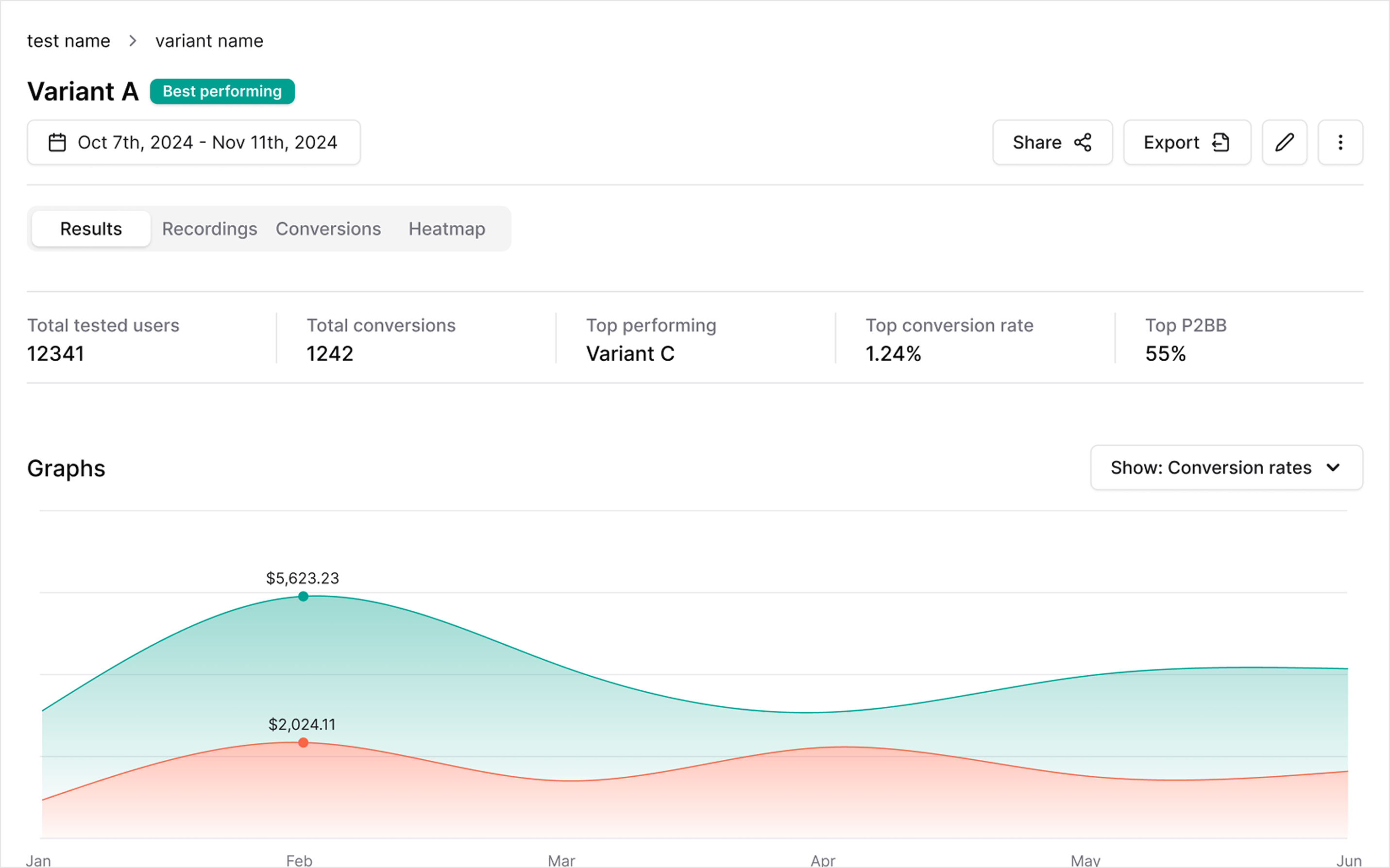
Optibase is the A/B testing platform we built because nothing on the market worked the way page builders actually work. Install it from the Webflow App Marketplace or drop the WordPress plugin in — and you're running tests in minutes. Variants are built in your existing design tool (the Webflow Designer, the WordPress editor, Elementor, Divi, whichever you're on), not in a clunky third-party visual editor that breaks on every CMS update.
What stands out:
Tradeoffs: If you're building a mobile app or a purely server-side experiment stack, Optibase isn't for you. It's purpose-built for marketing teams running tests on real websites.
See how it works on your stack: WordPress · Webflow · Elementor · Divi · Bricks · Oxygen · Breakdance · Gutenberg
G2 rating: 4.8 / 5

Starting price: ~$199/mo · Free plan: No · Best for: Mid-market teams that want testing, heatmaps, session recordings, and surveys in one account.
VWO has been in the A/B testing market for over a decade and it shows. The platform covers almost every CRO need — testing, heatmaps, funnels, surveys, personalization — in one interface. It was one of the biggest beneficiaries of Google Optimize shutting down in 2023.
Where it shines: teams with real traffic and a dedicated CRO lead who'll use the full suite. The Bayesian stats engine is solid, and the feature set runs deep.
Where it struggles: pricing and speed. Published plans start around $199/mo, but usable tiers for most B2B sites land closer to $400–$800/mo. Setup often involves pasting a script and wiring up integrations — not a big deal, but not the 10-minute install Optibase offers. WordPress and page-builder support exists but feels bolted on.
Read the full Optibase vs. VWO comparison →

Starting price: $50K+/yr · Free plan: No · Best for: Enterprise product and growth teams with dedicated experimentation engineers.
Optimizely is the most recognizable name in A/B testing. If you work at a public company with a team of optimizers and engineers, it's a defensible choice — the stats engine is best-in-class and the platform scales to billions of events.
Where it shines: omnichannel experimentation (web, mobile, server-side, feature flags), enterprise compliance, and deep analytics. Their AI assistant helps with variant ideas.
Where it struggles: price and complexity. Contracts typically start around $50,000/year and require annual commitments. The platform assumes a dedicated team — marketers without engineering support will feel lost. For anyone outside the Fortune 1000, it's almost always overkill.
Read the full Optibase vs. Optimizely comparison →

Starting price: Custom · Free plan: No · Best for: Mid-market and enterprise marketing teams that want personalization on top of A/B testing.
AB Tasty blends experimentation with a strong personalization engine. If your goal is "show different content to different segments and test what works," it's a legitimate contender.
Where it shines: segmentation, personalization rules, and emotional intelligence targeting (yes, that's a real feature — it infers intent from behavior). Good visual editor, good support.
Where it struggles: pricing is opaque. You can't get a number without a call, and once you do, expect mid-four figures per month minimum. Teams on WordPress or page builders won't find native integrations — everything runs through their JS snippet.
Read the full Optibase vs. AB Tasty comparison →

Starting price: $399/mo · Free plan: No · Best for: Agencies and teams with strict GDPR or data-ownership requirements.
Convert is the go-to choice for teams that care deeply about privacy. It has first-party tracking, EU data hosting, and an agency-friendly billing model.
Where it shines: GDPR compliance, honest support, and a stats engine respected by CRO consultants. The community around it is small but loyal.
Where it struggles: price to value. At $399/mo starting, it sits in premium territory without the full CRO suite that VWO offers at a similar price. No built-in heatmaps — you'll integrate with Hotjar or another tool. Setup takes longer than the faster no-code options.
Read the full Optibase vs. Convert comparison →

Starting price: Custom · Free plan: No · Best for: Mid-market to enterprise teams that want AI-generated variants and predictive targeting.
Kameleoon has invested heavily in AI. Their platform can generate variant copy, predict which visitor will convert, and auto-allocate traffic to the winning version.
Where it shines: AI variant generation, predictive personalization, and a genuinely polished visual editor. Solid in both web and full-stack testing.
Where it struggles: custom pricing (expect enterprise quotes), and the AI features only matter if you have enough traffic to feed them. Teams under 100,000 monthly visitors won't get the full value.
Read the full Optibase vs. Kameleoon comparison →

Starting price: Free up to 1M requests/mo, then pay-as-you-go · Free plan: Yes · Best for: Product engineers who want analytics, feature flags, session replay, and testing in one open-source stack.
PostHog bundles product analytics, session replay, feature flags, and A/B testing in a single platform. For product-led startups and scaleups, it's one of the best deals on the market.
Where it shines: generous free tier (1M feature flag requests/mo), both Bayesian and frequentist stats, and the open-source ethos. Everything talks to everything else.
Where it struggles: this is a developer tool. There's no drag-and-drop visual editor for marketers. Setting up a web A/B test requires writing code to gate variants behind a feature flag. If your team is non-technical, expect friction.
Read the full Optibase vs. PostHog comparison →

Starting price: Free self-hosted (MIT) · Free plan: Yes (3 users cloud) · Best for: Data and engineering teams that already have a data warehouse.
GrowthBook is built around the idea that your warehouse is the source of truth. Instead of sending user data to a third-party tool, GrowthBook queries your BigQuery, Snowflake, or Redshift directly.
Where it shines: open-source (MIT license), warehouse-native architecture, both Bayesian and frequentist stats with CUPED variance reduction, multi-arm bandits on the Pro plan ($40/user/mo).
Where it struggles: not a marketer tool. If you don't have a warehouse or a data engineer, it's the wrong choice. The visual editor exists on the Pro plan but lags behind dedicated web testing tools.

Starting price: Free tier + usage-based pricing · Free plan: Yes · Best for: Product and engineering teams that need feature flags and experimentation in the same platform.
Statsig was founded by ex-Facebook experimentation engineers. It's the closest thing to a "Facebook-style" experimentation platform available to everyone else.
Where it shines: feature flag + experimentation integration, fast evaluation, strong stats including sequential testing. Free tier is generous.
Where it struggles: same issue as PostHog — this is engineering software. Marketing teams running tests on WordPress or Webflow pages will find it heavy-handed.

Starting price: $29/mo · Free plan: No · Best for: Early-stage teams that want light A/B testing with heatmaps in one cheap tool.
Crazy Egg pioneered heatmaps and has since bolted on A/B testing. At $29/mo, it's one of the most affordable ways to run basic tests plus visual analytics.
Where it shines: price, simplicity, and the heatmap-to-test workflow — you see where people click, then test a fix.
Where it struggles: the testing engine is shallow. Frequentist-only stats, no server-side, limited segmentation, no Bayesian "call it" guidance. Fine for one or two tests a quarter; painful at scale.

Starting price: $74/mo · Free plan: No · Best for: Paid-ads teams running dedicated landing pages outside their main CMS.
Unbounce isn't really an A/B testing platform — it's a landing page builder with A/B testing built in. For teams running Google or Facebook ads to dedicated landing pages, it covers the full workflow.
Where it shines: fast landing page creation, Smart Traffic (their AI sends visitors to the best-performing variant automatically), and AMP templates for mobile speed.
Where it struggles: it only tests Unbounce pages. You can't use it to A/B test your WordPress homepage, your Webflow pricing page, or your app's signup flow. Single-purpose.

Starting price: ~$33/mo · Free plan: Yes · Best for: Solo marketers on a tight budget who want a visual editor and don't need heatmaps.
Varify is a newer European tool built for marketers. It's cheap, it's no-code, and it does the basics well.
Where it shines: low price, clean visual editor, GDPR compliance out of the box.
Where it struggles: no heatmaps, no session recordings, fewer integrations, smaller team behind the product. You'll outgrow it faster than you'd like if you're serious about CRO.
Read the full Optibase vs. Varify comparison →

Starting price: Bundled with Webflow Enterprise (~$276/mo equivalent) · Free plan: No · Best for: Webflow Enterprise customers who want a first-party testing tool.
Webflow Optimize is Webflow's native A/B testing feature. It's built into the Designer and integrates cleanly with Webflow's hosting stack.
Where it shines: no third-party script, tight Webflow integration, decent visual editor (it is the Designer).
Where it struggles: it's only available on Webflow Enterprise — which means you're paying Webflow Enterprise rates to access it. No heatmaps. No WordPress or builder support. Limited to the Webflow ecosystem.
Read the full Optibase vs. Webflow Optimize comparison →

Starting price: Free · Free plan: Yes · Best for: Small teams already using GA4 who need one free, lightweight test per quarter.
When Google Optimize shut down in September 2023, Google nudged users toward GA4's built-in Experiments feature. It's free, it works, and it lives where your analytics already live.
Where it shines: price (free) and zero extra setup if you already have GA4.
Where it struggles: the feature is deliberately limited. No multivariate, no advanced targeting, no visual editor — you implement variants yourself with code and GA4 splits traffic. It's a reporting layer on top of your own code, not a real testing platform. Fine for one-off experiments, not a system.
Pick the tool that matches your setup, not the one with the biggest name. Five questions will get you to the right answer:
If it's WordPress, Webflow, or a page builder, pick a tool that's native to that stack. Enterprise tools work eventually on WordPress, but the setup will frustrate you for weeks. See our platform-specific guides for WordPress, Webflow, Elementor, Divi, Bricks, Oxygen, Breakdance, and Gutenberg.
If no, rule out Optimizely, PostHog, Statsig, and GrowthBook. They're powerful but assume engineering support. Go with Optibase, VWO, or Convert.
Under 50,000 visitors/month — enterprise tools are overkill. Stick to the $30–$200/mo tier. Over 500,000 — your stats will be stronger and enterprise tools start to pay off.
If yes, you're looking at Statsig, PostHog, GrowthBook, or Optimizely Full Stack. If no (most marketing teams), don't pay for them.
If you hate "contact sales," skip Optimizely, AB Tasty, and Kameleoon. Optibase, VWO, Convert, and the open-source tools all publish prices.
Still unsure? The safe default for most marketing teams on WordPress, Webflow, or a page builder is Optibase. It's what we built the product for.
Even the best platform won't save a poorly designed test. Five traps we see constantly:
If you stop a test the moment one variant looks like a winner, you're often reading noise. Use a duration calculator before you launch to know how long you need to run.
You need a minimum number of visitors and conversions to trust the result. Our sample size calculator tells you what you need before you start.
If you change the headline, button, and image in one variant, you can't tell which change moved the needle. Either isolate one change per variant, or use real multivariate testing with a tool that can handle it.
If visitors see the original content for a split second before the variant loads, two bad things happen — they notice it (bad UX) and your result is biased toward the variant they saw longest. Pick a platform with zero-flicker rendering.
"Clicks on the hero button" is not a goal — it's a metric. Tie every test to an outcome that matters: paid signups, demo requests, revenue.
The landscape looks different than it did three years ago. Five things worth knowing:
The free incumbent shut down September 30, 2023. GA4 Experiments is the nearest replacement but is deliberately thin. Most teams migrated to VWO, Optibase, or Convert.
Kameleoon, Optimizely, and VWO all ship AI features that generate variant copy, predict winners, or auto-allocate traffic. Treat these as helpful shortcuts, not magic — the quality of the underlying test still depends on your hypothesis.
Product teams want to test code changes, not just CSS. Tools like PostHog, Statsig, and GrowthBook have made server-side experimentation accessible. For marketing tests on websites, client-side is still the right choice.
In the EU, consent mode v2 changed how you can collect data for experiments. Tools with first-party tracking (Convert, Optibase) handle this more cleanly than those relying on third-party cookies.
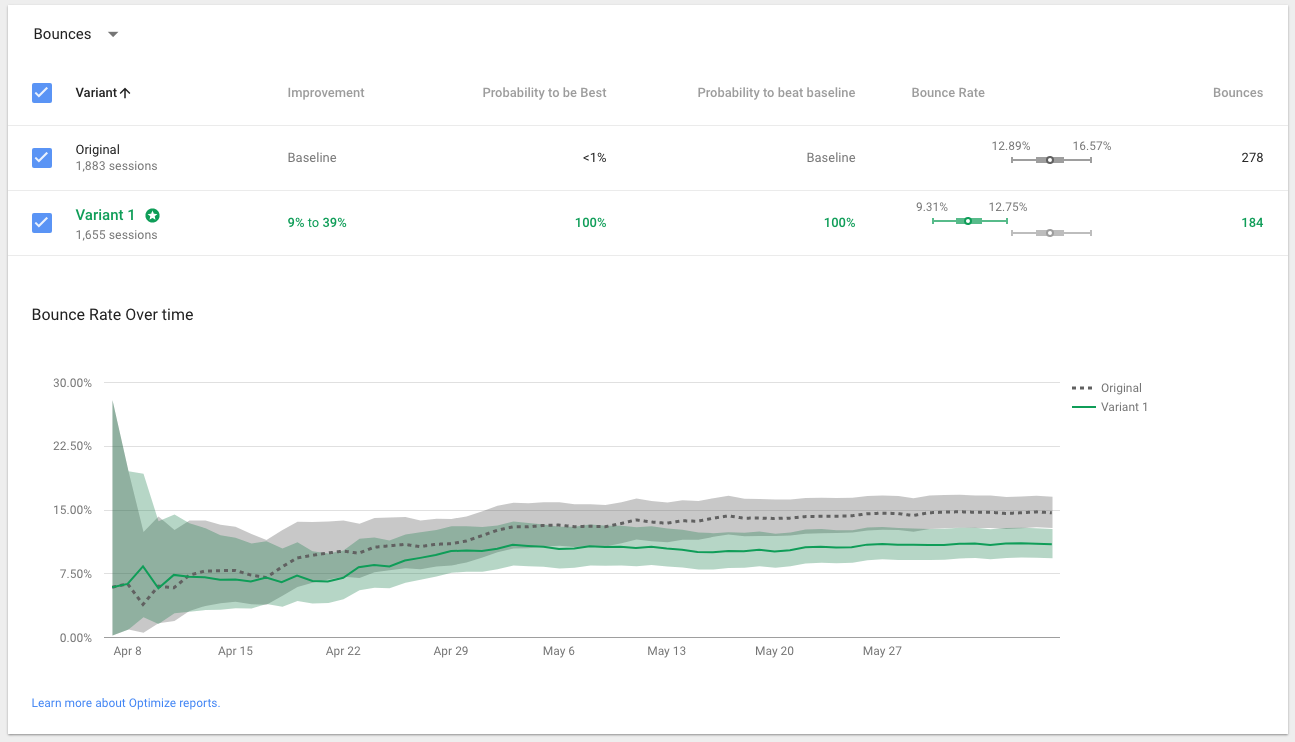
Frequentist stats (p-values, "95% significance") still dominate but Bayesian approaches are more intuitive for marketers — "there's an 87% probability variant B beats A" is easier to act on. Most modern platforms now offer both.
An A/B testing platform lets you show two or more versions of a page or element to different visitors and measure which version drives more conversions. A good platform handles traffic splitting, statistical analysis, and reporting so you can run tests without building the infrastructure yourself.
For most WordPress sites, Optibase is the fastest to set up and the cheapest full-featured option. It installs as a plugin, doesn't require code, and works across all major page builders. See our WordPress A/B testing guide for the full setup.
Optibase is the only A/B testing tool that lives inside Webflow's App Marketplace. One-click install, variants built in the Designer, zero flicker. Webflow Optimize is the first-party alternative but only comes bundled with Webflow Enterprise. See our Webflow guide for the full breakdown.
No. Google Optimize shut down on September 30, 2023. Google replaced it with a limited "Experiments" feature inside GA4. Teams that relied on Optimize mostly migrated to VWO, Optibase, or Convert.
Not with a tool built for marketers. Optibase, VWO, Crazy Egg, Varify, and Unbounce all let you build tests without writing code. Optimizely, PostHog, Statsig, and GrowthBook all assume some developer involvement.
Pricing ranges widely. Entry-level tools start at $29–$69/mo (Crazy Egg, Varify, Optibase). Mid-market platforms run $199–$400/mo (VWO, Convert). Enterprise platforms start at $50,000/year (Optimizely). Many — AB Tasty, Kameleoon — only quote custom prices.
A/B testing compares two versions with one change between them. Multivariate testing compares multiple changes at once and tells you which combination wins. Use A/B for clear, single-hypothesis tests. Use multivariate when you have enough traffic to test combinations.
Yes. GA4 Experiments is free. PostHog has a free tier up to 1M feature flag requests/mo. GrowthBook is free if you self-host. Optibase has a free plan for small sites. Each has limits — read the fine print before committing.
Bayesian tells you "the probability B beats A is X%." Frequentist tells you "this result is statistically significant at the 95% level." Bayesian is easier to interpret mid-test. The best platforms (Optibase, PostHog, GrowthBook, Optimizely) support both.
Flicker happens when visitors see the original content for a moment before the variant loads. It hurts UX and biases your results. Pick a platform with first-render variant injection. Optibase, VWO, and Convert all render flicker-free by default. Most cheaper tools don't.
Optibase is built for the way modern marketing teams actually work — on WordPress, Webflow, and every page builder that matters. Install in minutes. Launch your first test today. No credit card needed.
Join 3,000+ companies testing with Optibase.

